Forget Pip, Poetry & Virtualenv: This Rust-powered Tool is the Only Python Package Manager You'll Ever Need
uv folds pip, pipx, poetry, pyenv, and virtualenv into one Rust-powered tool that is 10-100x faster. I called it the game-changer we had all been waiting for; the ecosystem agreed.

Image generated with Ideogram
Hello, fellow Pythonistas! I’m going to introduce you to uv, the Rust-powered Python package manager that’s going to crank up your development workflow to 11. But, according to the words of the developers, due to the latest updates, uv is now:
An end-to-end solution for managing Python projects, command-line tools, single-file scripts, and even Python itself.
Having wrestled with the various ways of managing Python and Python packages for years (though I can safely say, the Node ecosystem is way, way, WAY worse to have to deal with!), I have no hesitation in saying, without hyperbole: uv is the game-changer for which we’ve all been waiting.
The Swiss Army Knife of Python Tools
Remember juggling between pip, pip-tools, pipx, poetry, pyenv, and virtualenv? Those days are over. uv is like the Avengers of Python tools — it combines the powers of all these tools into one supersonic package manager. And when I say supersonic, I mean it.
Speed That’ll Make Your Head Spin
Let’s talk performance. uv isn’t just fast; it’s ludicrously fast. We’re talking about a 10–100x speedup compared to pip. Don’t believe me? Check out this benchmark:
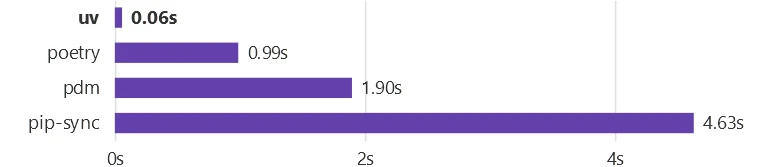
This isn’t just a marginal improvement; it’s a quantum leap. Installing Trio’s dependencies with a warm cache? uv does it in the blink of an eye. It’s like upgrading from a bicycle to a teleporter.
Features, Features, FEATURES
But uv isn’t just about speed. It’s packed with features that’ll make your Python development life a breeze:
- Python Version Management: Need Python 3.10, 3.11, and 3.12 for different projects? uv’s got you covered. It installs and manages Python versions faster than you can say “virtual environment.”
- Tool Management: Run and install Python applications with ease. It’s like pipx, but integrated seamlessly into your workflow.
- Script Support: Got a single-file script with dependencies? uv handles that too, with support for inline dependency metadata. It’s like having a mini-project manager for each script.
- Comprehensive Project Management: uv provides a universal lockfile, making your projects more portable than ever.
- Workspaces: For those large-scale projects, uv supports Cargo-style workspaces.
- Global Cache: uv is disk-space efficient, with a global cache for dependency deduplication. Your SSD will thank you.
Some Hands-On Experience
Ready to check it out for yourself? Here’s how to get started (It’s super easy and painless, I promise):
# On macOS and Linux
curl -LsSf https://astral.sh/uv/install.sh | sh

# On Windows
powershell -c "irm https://astral.sh/uv/install.ps1 | iex"

# With pip (if you must, not the preferred way though)
pip install uv
After installation, don’t forget to add the correct paths to your PATH environment variable (the installation will tell you which folder).
Setting Up a New Project
Once set up, you can initialize a new project anywhere using:
uv init my_awesome_project
cd my_awesome_project
This will start you off with the following folder structure:
[ROOT]/
`-- my_awesome_project
    |-- pyproject.toml
    |-- README.md
    `-- src
        `-- my_awesome_project
            `-- __init__.py
Let’s have a closer look at the pyproject.toml file which will look like this:
[project]
name = "my-awesome-project"
version = "0.1.0"
description = "Add your description here"
readme = "README.md"
requires-python = ">=3.12"
dependencies = []

[build-system]
requires = ["hatchling"]
build-backend = "hatchling.build"
Now, of course we all know how important it is to work with virtual environments and keep our workspaces clean and self-contained.
This too is made easier with uv — Infinitely easier!
Let’s say we want to start off using Python 3.12 but we don’t have it yet. No problem! We can simply run the following command to have uv install it for us before we set up our virtual environment.
uv python install 3.12Then, when you are ready to create your virtual environment, you can run:
uv venv --python 3.12The output should be something like this:
Creating virtualenv at: .venv
Activate with: .venv\Scripts\activate
Notice how even though it says you can activate using .venv\Scripts\activate, you do not have to do it when using uv.
Installing Packages
If you now add a new package using uv instead of pip, like for example our Atomic Agents library if we want to set up a new Agentic AI project, we can simply run the following:
uv add atomic-agentsThis will install atomic-agents and also generate a uv.lock file so that later on, you can install these exact versions using the uv sync command.
Additionally it will have added atomic-agents to the pyproject.toml file. It should now look like this:
[project]
name = "my-awesome-project"
version = "0.1.0"
description = "Add your description here"
readme = "README.md"
requires-python = ">=3.12"
dependencies = [
    "atomic-agents>=0.3.0",
]

[build-system]
requires = ["hatchling"]
build-backend = "hatchling.build"
If you do want to have a requirements.txt file as well, you can run:
uv pip compile pyproject.toml -o requirements.txtYou can also always install from a requirements file like this by using uv pip sync.
One More Thing
I just wanted to showcase a really cool, quick feature that uv offers that can be handy in some circumstances.
Let’s say you have a script, but you don’t really want it, or its dependencies, to be part of your application. This could be a utility script to copy some files, do some build preprocessing, …
For example, you can make the following file anywhere on your PC:
import requests

# Make a GET request to the JSONPlaceholder API
response = requests.get("https://jsonplaceholder.typicode.com/posts/1")

# Check if the request was successful
if response.status_code == 200:
    # Print the response content
    print("Response content:")
    print(response.json())
else:
    print(f"Request failed with status code: {response.status_code}")
Let’s imagine that we DON’T have the requests library installed
C:\dev\some_codebase> python example.py
Traceback (most recent call last):
  File "C:\dev\some_codebase\example.py", line 1, in <module>
    import requests
ModuleNotFoundError: No module named 'requests'
We can run the following:
C:\dev\some_codebase> uv add --script example.py requests
Updated `example.py`

C:\dev\some_codebase> uv run example.py
Reading inline script metadata from: example.py
Response content:
{'userId': 1, 'id': 1, 'title': 'sunt aut facere repellat provident occaecati excepturi optio reprehenderit', 'body': 'quia et suscipit\nsuscipit recusandae consequuntur expedita et cum\nreprehenderit molestiae ut ut quas totam\nnostrum rerum est autem sunt rem eveniet architecto'}
And bada-bing bada-boom there you have it, an isolated way of running this script without having to install the dependencies globally or in a project where you do not want them to be installed.
This is great for standalone scripts, such as my super simple global speech-to-text script from This Simple AI-powered Python Script will Completely Change How You Work.
That’s All, Folks!
For now, I’ll leave it here. I am sure I’ll be getting plenty of use out of uv, its speed alone is incredible! At the same time, I am certain that I am only scratching the surface of this incredible tool, so give me a follow and stay updated on when I post a new article about this amazing tool.